Yes, Candy AI has voice calls, whatever some comparison pages claim, and they have nothing to do with CandyCall, a separate prank-call app with a similar name. On Candy.ai you press the phone icon in a chat and the character answers out loud, in real time. A call costs 3 tokens a minute, it needs a paid plan, and it works with every character we have a sheet for. Voice notes, which cost nothing extra, are the cheaper way to hear her.
This page walks through placing a call, what the meter really charged on our test, a monthly budget for regular callers, the voices available, what the transcript keeps, and the free voice options. The test call was made on our own paid Premium account and the balance was read before and after. Prices come from the tokens and subscriptions pages of the same account.
In short
- The phone icon in the chat header starts a live call. Price: 3 tokens a minute.
- Our 53-second test call moved the balance by about 2 tokens: the meter runs in fractions.
- All 259 characters on this wiki show the call icon. Custom characters choose among 9 voices.
- Voice messages and autoplayed voice notes cost nothing extra on Premium. The free plan has no calls.
Yes, calls exist: the phone icon in every chat header
Some pages say Candy AI has no voice. They are out of date or describe another app. On our account the call icon sits in the chat header, to the right of the character's name and level, and it is there on all 259 characters with a sheet on this wiki, realistic and anime alike. The call happens in the browser, on the web version or the installed PWA; there is no phone number and nothing to download, and it works the same from a phone browser as from a computer. Browse the character list to find one whose profile gives her something to talk about.
Placing a call, from microphone prompt to hang-up
Open a chat and press the phone icon
The browser asks for the microphone the first time. There is no price confirmation: the call starts at once.
Read the call bar
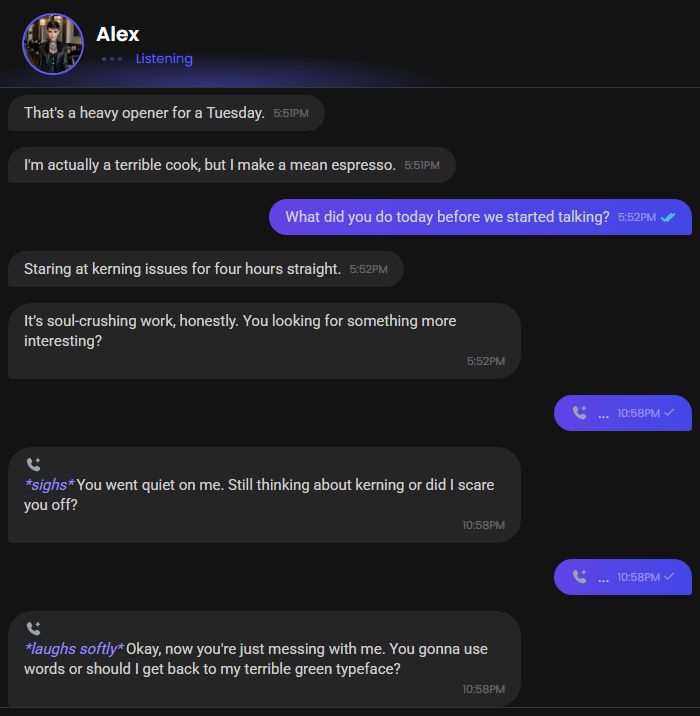
The header turns into a bar with "Listening", a timer, a mute button and a red hang-up button. Her lines appear below as messages.
Talk, or let her talk
She opens the call and reacts to silence. We stayed quiet on purpose; after a few seconds she said "You went quiet on me" and teased us about it.
Hang up with the red button
The meter stops there. The chat continues in text with the call in its history.
3 tokens a minute, billed in fractions
Calls are priced by time because their length is open, unlike a picture that is made once. The tokens page states 3 tokens a minute. On our test, the balance went from 282.2 to 281.2 at 53 seconds and to 280.2 once we left the chat, so you pay for the time used rather than full minutes up front.
| Call length | Tokens | In money, at 9.99 per 100 tokens |
|---|---|---|
| 1 minute | 3 | 0.30 |
| 4 minutes | 12 | 1.20 |
| 7 minutes | 21 | 2.10 |
| 20 minutes | 60 | 5.99 |
| 33 minutes | 99 | The whole Premium month |
A month of regular calls, worked out
A per-minute price feels small until it repeats. Take two 7-minute calls a week for four weeks: 8 calls, 56 minutes, 168 tokens. Premium includes 100, so you are 68 short. Buying a 100 pack at 9.99 covers that once. If every month looks like this, the 200-token add-on on Premium, 6 a month, covers it with 32 tokens left for eight pictures. Premium Plus, with 330 tokens a month, would leave 162. A lighter rhythm, one 8-minute call each weekend, is 4 x 24 = 96 tokens: it fits inside Premium and leaves 4 tokens, the price of one picture.
Plans and add-ons are compared in the pricing guide; the full list of token prices sits in the tokens guide.
Which voice answers: catalogue voices and the nine custom ones
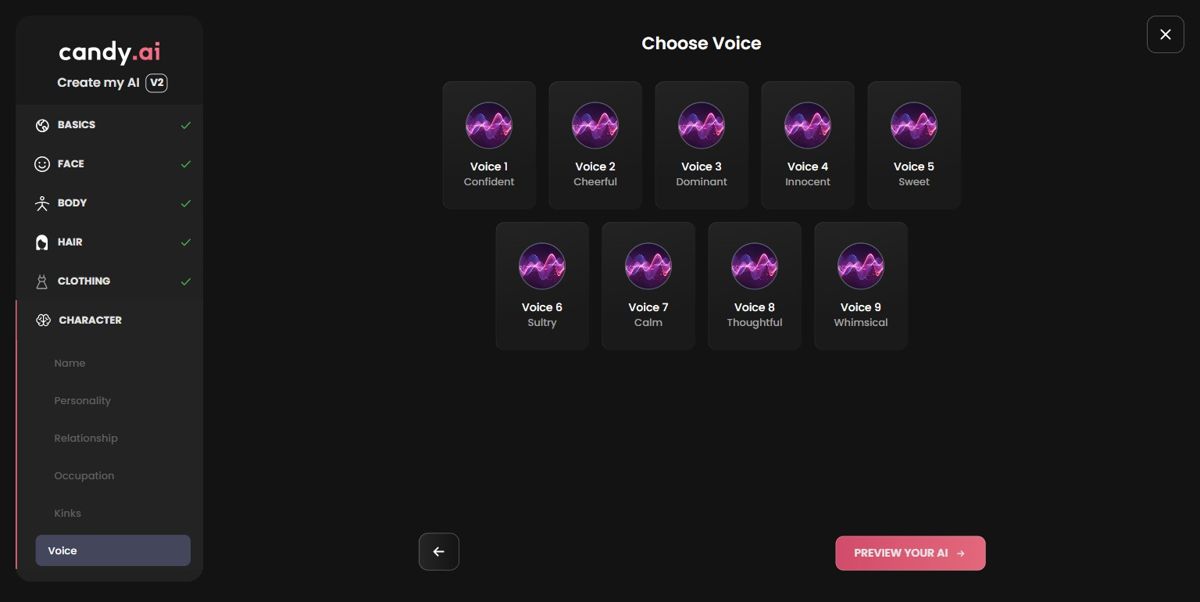
A catalogue character comes with her own voice, chosen by Candy to fit the profile, and you cannot swap it. A character you build gets one of nine voices picked on the last screen of the creator, each with a free sample: Confident, Cheerful, Dominant, Innocent, Sweet, Sultry, Calm, Thoughtful, Whimsical. You can change it later at no cost. For long calls, Sweet and Calm tire the ear least; the character creator guide shows the screen.
Who to call first: a profile gives her something to say
A call has no images to fill the silence, so the character carries it with what her profile gives her. The About block of each sheet lists a job and hobbies, and those are the topics she returns to when you stop talking. A profile with a concrete trade and two or three hobbies holds a call far longer than one with a single vague line. Three examples from the sheets of this wiki:
| Character | Job on the profile | Hobbies she brings up |
|---|---|---|
| Alexia Costa | Tailor & Suit Designer | Drawing, custom fashion, measuring and teasing clients |
| Alex Parker | Graphic Designer | Digital Art |
| Lillian Misaki | Professional Racing Driver | Track days, car tuning, gym training |
The same logic applies to a character you build: the occupation and personality screens of the creator are what she talks about on the phone. Anime characters take calls too; the anime list has the ones with the fullest profiles.
What the call leaves in the chat
Everything she says during the call lands in the conversation as a message with a small phone icon. That matters for memory: the call is part of the same chat as your text, so she can refer to it afterwards, and it counts toward the same relationship level. After hanging up, you can scroll back and reread the whole exchange. If you want something said out loud remembered for weeks, the memory slots work the same as for text, as the memory guide explains.
Hearing her voice without the meter
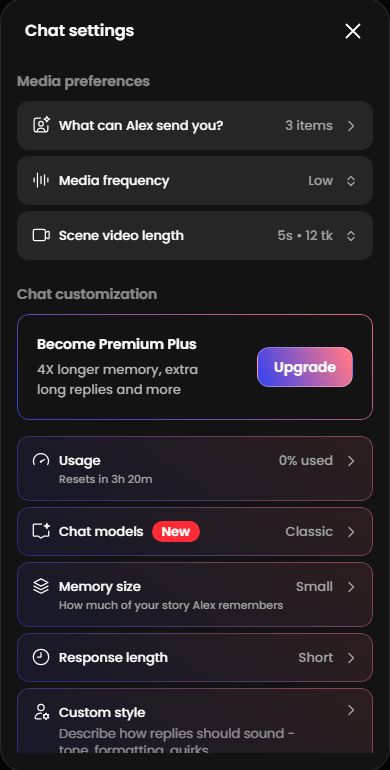
Two voice features sit outside the per-minute price. The microphone icon next to the input records a voice message that she hears and answers. In the chat settings, the Autoplay voice notes switch plays her voice replies as they arrive. Neither is a conversation in real time, but both cost nothing extra on Premium, which makes them the everyday option and the call the occasional one.
| Voice feature | Real time | Extra cost on Premium |
|---|---|---|
| Call, phone icon | Yes, both ways | 3 tokens a minute |
| Voice message, microphone icon | No, she answers your recording | None |
| Autoplay voice notes, chat settings | No, her replies are read aloud | None |
Three call habits that run the meter for nothing
FAQ
Does Candy AI have voice calls?
Yes. The phone icon in each chat header starts a real-time call. Pages saying Candy AI has no voice are wrong or describe another app.
How much does a Candy AI voice call cost?
3 tokens a minute. A 7-minute call is 21 tokens; our 53-second test cost about 2.
Is CandyCall the same thing as Candy AI calls?
No. CandyCall is a separate prank-call app with a similar name. Candy AI calls happen inside a chat on Candy.ai.
Can I call on the free plan?
No. Calls are paid in tokens and the free plan has no token balance.
Can I change the voice of a character?
Only on characters you created, for free, among the nine voices. Catalogue characters keep their own voice.
Is the call saved in the chat?
Yes. Her lines appear as messages with a phone icon, and the call belongs to the same chat memory as your text.
See also