You have an account, or you are about to make one, and the home page shows a wall of faces and a dozen menu items. Where do you start? Sign up with an email or one click, pick one character from the catalogue, chat by text, and only then try images and calls. Text is unlimited on Premium. Everything visual runs on tokens, and the 100 tokens included each month go fast if you click every button in the first evening.
This guide follows the order of a first session: sign-up, the app question, choosing or creating a character, the chat screen, the first image, the settings, then the parts of the menu most people never open. A table lists the eight actions that cost tokens. All of it was done on our own paid Premium account, with prices read from the chat, the tokens page and the checkout.
In short
- Sign up with email, Google, Apple or Discord. You must be 18 or over. No card for the free plan.
- No store app: Candy AI runs in the browser and can be added to your phone's home screen.
- Text is free on Premium. An image is 4 tokens, a call 3 a minute, a custom character 10.
- Start with one catalogue character among 247, then decide about the creator.
Signing up takes one email or one click
Candy AI asks for very little at the door because the free plan is meant to get you into a chat quickly. You can register with an email and password, or log in with Google, Apple or Discord. The site is for adults only, 18 and over. No card is asked until you choose a plan.
Open candy.ai and click sign up
The login box offers email or the three one-click options.
Pick a login method
Email and password, or one click with Google, Apple or Discord. The account is the same whichever you use.
Land on the home grid
You are on the free plan: 5 messages, 1 image, 1 creation. The free plan guide explains each limit.
Is there a Candy AI app? Use the browser instead
There is no Candy AI app in the App Store or on Google Play. The service runs as a website and as a progressive web app: open it in your phone's browser, choose "Add to home screen", and it opens full screen like an app, with the same account and chats as on your computer. This also means anything sold as a Candy AI APK does not come from Candy.
The interface exists in English, German, Spanish, Dutch, Italian, French and more, and each chat can reply in its own language.
Choose from the catalogue or build your own?
Begin with the catalogue. The 247 characters already have a personality, a voice, a picture style and an opening message, so you see how Candy AI behaves before you put effort into anything. Catalogue characters also carry the extras: some have live action scenes, some have Shorts series, some sell private content packs.
The creator is fourteen screens long and costs 10 tokens on the final click. It makes sense once you know what you like: looks, personality, relationship, one of 9 voices. Our character creation guide walks through every screen.
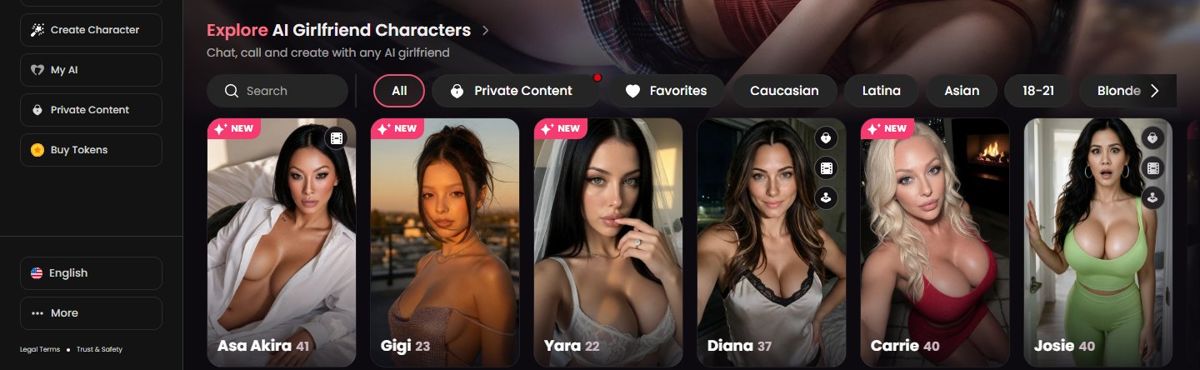
Before you click, the cards tell you a lot: badges show which characters have Live Action or a Shorts series, and a lock marks private packs. On this wiki, characters with live actions have their own list.
Reading the chat screen: three zones and what each one does
The chat screen packs many controls into one view, which is why first-time users click the wrong thing. It has three zones. The middle is the conversation, where every character writes first. The right panel holds the profile, the gallery and the gifts tab. The header holds the phone icon for calls, a three-dot menu and the panel toggle. Under the input sit the Image and Video buttons, with the gift box and microphone next to them.
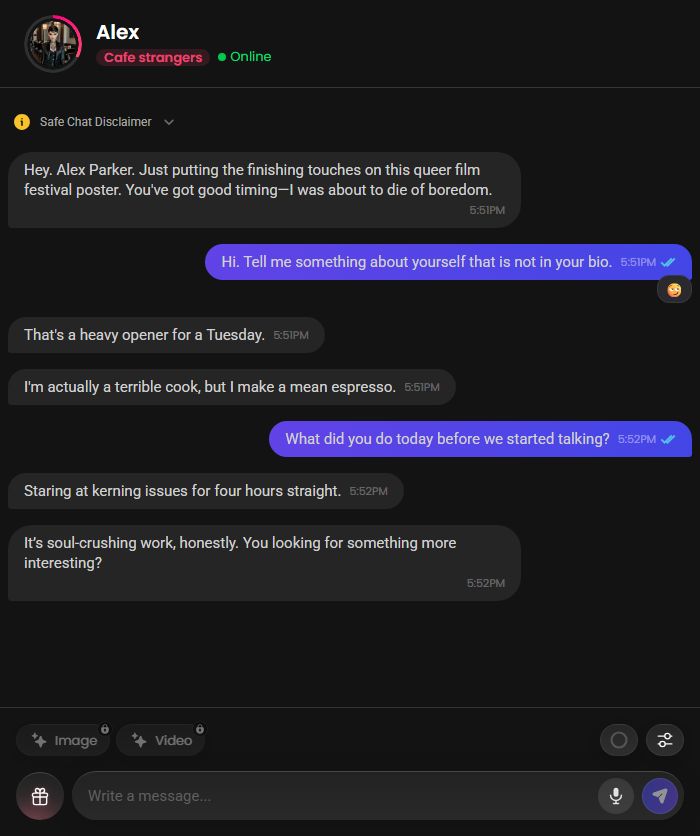
Short messages get better replies. Answers often arrive in two or three bubbles, and the emoji row under each reply lets you react, which the character picks up. The chat modes and memory guide covers the two chat modes and the level under her name.
Your first image, and why the button may be locked
There are two ways to get a picture. The Image button in the chat creates one that matches the conversation. The Generate Image page in the left menu uses a prompt box with outfit suggestions. Both cost 4 tokens. On a fresh chat with a catalogue character, the in-chat button can refuse: it waits for a relationship level, so a character "warms up" before sending pictures.
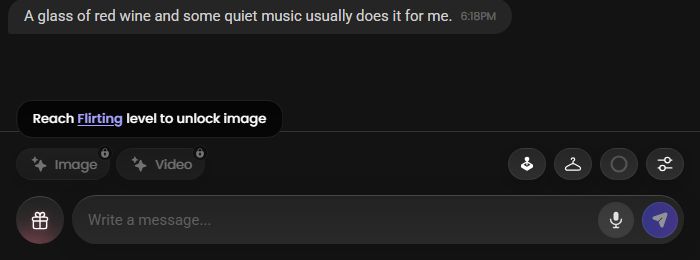
Keep talking for a while and the lock lifts. The image and video guide covers prompts and the video button.
Eight actions that spend tokens, and one that never does
Knowing the price of each button before you press it is the single thing that makes 100 tokens last a month. Text is the one action that never costs tokens on a paid plan.
| Action | Tokens | Where |
|---|---|---|
| Text message | 0 on Premium | Any chat |
| Image | 4 | Chat or Generate Image page |
| Voice call | 3 a minute | Phone icon in the chat header |
| Custom character | 10 | Create Character, final button |
| Live action, skip to level 2 | 10 | Live Action tab |
| Scene video in chat | 12 for 5 seconds | Chat settings |
| Gift | 5 to 999 | Gift box next to the input |
| Private content pack | 70 to 530 seen | Lock icon on the profile |
| Change Face in the creator | 1 | Creator preview |
A realistic first evening: twenty messages (0), two images (8), a 5-minute call (15) and one live action level skip (10) comes to 33 tokens, which leaves 67 of the month's 100. Extra tokens start at 9.99 for 100.
Settings worth changing in your first five minutes
Each chat has its own settings, behind the sliders icon next to the input. They change the feel of the conversation more than the choice of character does, so set them early rather than after a week of replies you do not like.
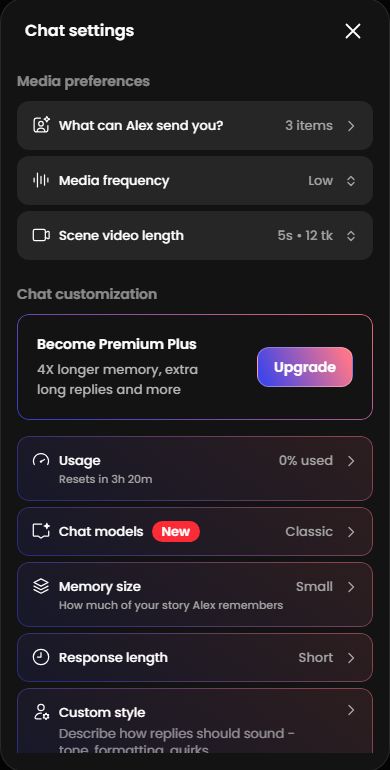
- Response length: Short gives quick texting, Normal gives fuller replies.
- Narration: on adds actions in asterisks, useful for scenes.
- Media frequency: lower it if you do not want unprompted pictures.
- Chat language: Auto follows your messages, or force one language.
Menu pages most new users never open
- Collection stores every image you generate, sorted by character, so you never need to save from the chat.
- Achievements is a badge system, 134 badges for messages sent and relationships levelled. Cosmetic only.
- Create Group Chat puts two or three characters in one conversation.
- Personas in settings let you describe yourself once so characters know who they talk to.
- Private Content lists packs by character; read our private content list before buying.
Three habits that empty 100 tokens before the weekend
FAQ
How do I sign up for Candy AI?
With an email and password, or a Google, Apple or Discord login. The site is for adults only, and no card is needed for the free plan.
Is there a Candy AI app for Android or iPhone?
No. There is no store app. Open candy.ai in your phone's browser and add it to the home screen to use it like an app.
Should I choose a character or create one?
Choose first. Catalogue characters are ready, free to chat with on Premium, and show you how the app writes. Creating one costs 10 tokens.
Do I need tokens to chat?
No. Text is unlimited on any paid plan. Tokens are only for images, calls, videos, scenes, gifts and packs.
Can I talk to several characters?
Yes. Each chat is separate, with its own memory and relationship level. Group chats with two or three characters also exist.
Which language does the character use?
Auto by default, which follows your messages. You can set a fixed language per chat in the chat settings.
See also
