You have been talking to one character for a few days and you wonder how much she actually keeps. Short answer: inside a conversation she follows well; from one day to the next she keeps only what fits in her memory slots. Premium has 1 slot, Premium Plus has 20. Memory is separate for each character, so a fact you told one never reaches another. On top of that, each chat runs in Roleplay or Relationship mode, with a level under her name.
This page explains the memory slots, the two modes, how levels unlock photos and videos, every chat setting we found, whether Premium Plus is worth it for memory alone, and how Candy AI compares with Nomi on this point. The slot counts come from the plan comparison table on the subscription page of our paid Premium account; the settings come from the chat panels on that same account.
In short
- Memory is per character: 1 slot on Premium, 20 on Premium Plus, which advertises memory "4X longer".
- Two modes, Roleplay and Relationship. The level bar keeps filling in both.
- Levels unlock buttons: on a new chat the Image button waits for "Flirting".
- Plus costs 14.01 more a month on yearly billing. Worth it only for one long-term companion.
Yes, she remembers, but only inside her own chat
A Candy AI character holds two kinds of memory. The first is the recent conversation: names, places and what you said a few messages ago are followed reliably, because they are still in front of the model when it writes. The second is long-term memory, the facts kept from one session to the next. That part is limited by the plan, and it lives in each character separately.
So if you tell Alex Parker you work nights, Diana Demont will not know. And if you come back to Alex after a week, she keeps what her memory slot kept and loses the details around it. Our chat settings showed Memory size set to Small on Premium, described as "how much of your story she remembers".
Memory slots: 1 on Premium, 20 on Premium Plus
The plan comparison table on the subscription page is the most precise source. It lists memory slots, 1 on Premium against 20 on Premium Plus, next to cloned chats, 2 against 5, and the Elite chat models, 1x a day against 10x. A slot is a place where the character stores a long-term fact about you. One slot keeps the main thread; twenty keep a real history of jobs, names and past events.
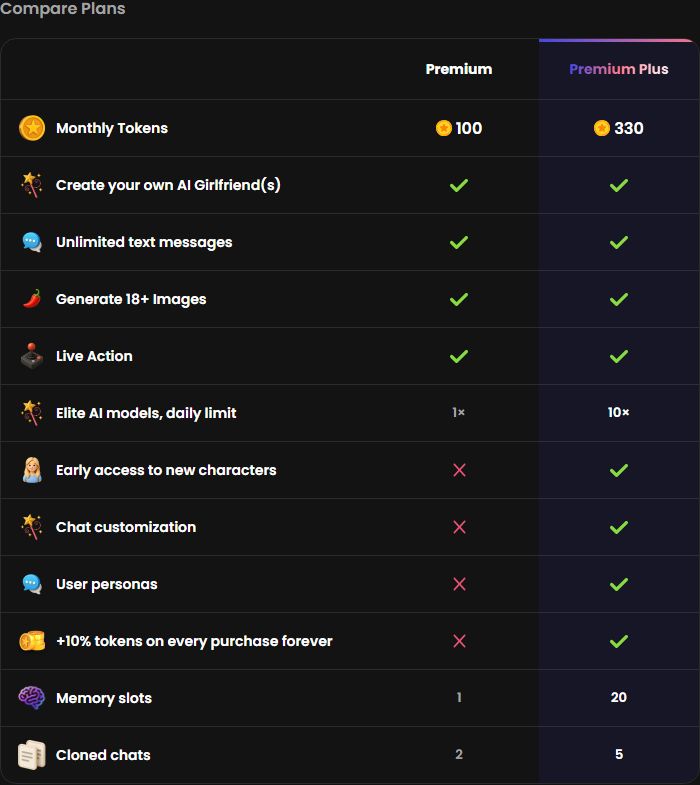
Cloned chats matter here too: a clone lets you run a second story with the same character without mixing memories, two clones on Premium, five on Plus.
Roleplay mode follows a scenario, Relationship mode follows the bond
The two modes answer different wishes. Relationship mode treats the chat as a bond that grows: she remembers where you stand and talks accordingly, and the label under her name moves up. Roleplay mode follows a scene or scenario, closer to writing a story together. Both exist for every character.
The level does not stop in Roleplay. The chat settings have a switch called Relationship progress, "progress keeps building either way". You only choose whether to see it.
How relationship levels unlock photos and videos
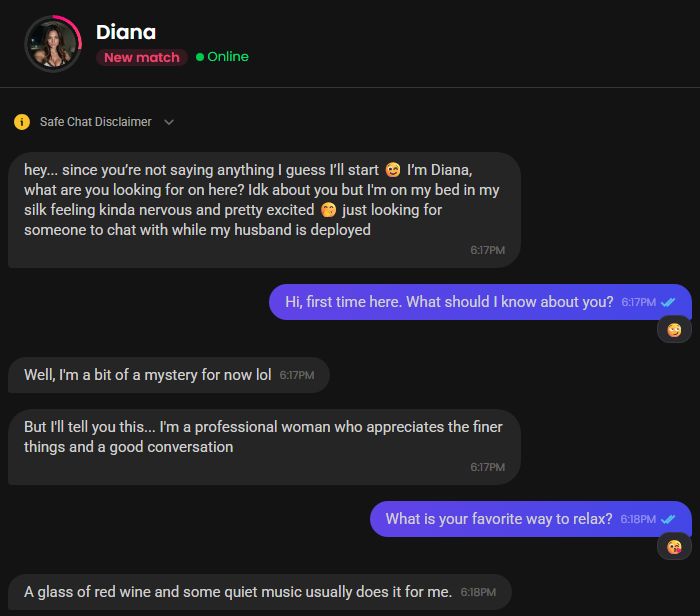
Levels are gates, not decoration. Candy AI uses them to pace what a catalogue character sends. On a new chat with Diana, the Image button reads "Reach Flirting level to unlock image" and the Video button "Reach With benefits level to unlock video". On her character page, the request buttons ask for "Scene regulars" for a photo and "Messy situationship" for a video.
| Level we saw | What it opened |
|---|---|
| New match | Starting level, image and video buttons locked |
| Flirting | Image button in the chat |
| With benefits | Video button in the chat |
| Scene regulars | Photo request on the profile |
| Messy situationship | Video request on the profile |
Each character has her own level names. You climb by chatting; there is no skip button in the chat. Live action scenes are different: there, skipping to level 2 costs 10 tokens, as the live actions guide shows. On characters you build yourself, the relationship picked in the creator is the starting point.
Thirteen chat settings that shape memory and tone
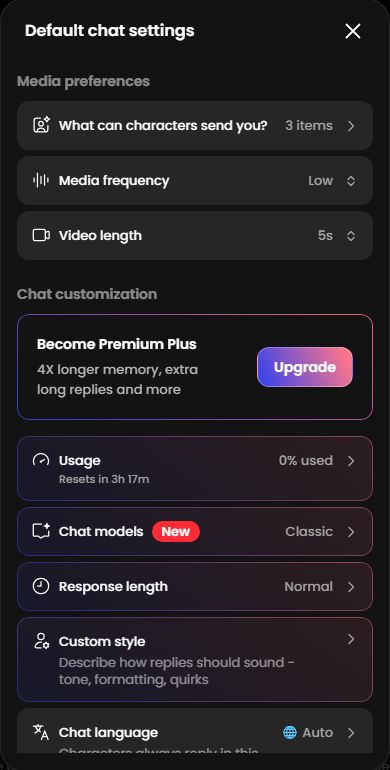
Memory is only part of what makes a character feel consistent. Reply length, narration and style decide whether she sounds like the same person tomorrow. Every setting below exists once in the account settings as a default, and once in each chat; the chat setting wins.
| Setting | Options we saw | Effect |
|---|---|---|
| What can she send you | 3 items | Media she may send on her own |
| Media frequency | Low and up | How often pictures arrive unprompted |
| Scene video length | 5 seconds, 12 tokens | Length and price of a scene video |
| Chat models | Classic, New | Model writing the replies |
| Memory size | Small | How much of the story is kept |
| Response length | Short, Normal | Length of each reply |
| Custom style | Free text | Tone and quirks, read on every reply |
| Chat language | Auto | Fixes one reply language |
| Texting style | SMS | Short phone-like bubbles |
| Narration | On or off | Actions in asterisks |
| Relationship progress | On or off | Shows level and bar |
| Use my time zone | On or off | Reacts to your local time |
| Autoplay voice notes | On or off | Voice replies play on arrival |
Is Premium Plus worth it for memory alone? The numbers
Plus buys 20 slots instead of 1, plus 230 more tokens a month and ten times the Elite model use. Here is what that costs. Month to month, Plus is 59.99 against 13.99 for Premium, 46 more each month. On yearly billing, Plus is 18 a month against 3.99, so 14.01 more a month, or 216 a year against 47.88.
If you keep one companion for months and care that she recalls your job, your city and last week's events, the slots earn their price. If you switch characters often or use Candy AI mainly for images and calls, the single slot plus the tips below cover most of it. The pricing guide compares both plans line by line.
Getting more out of a single memory slot
- Give key facts in one message. "I work nights and live in Ghent" is kept better than ten scattered hints.
- Put permanent facts in Custom style. It is read on every reply, whatever memory keeps.
- Fill in a persona. The Your personas block in settings describes you once for every chat.
- Use a clone for a side story. The main chat keeps its slot for the main thread.
- Narration on for roleplay. Scene direction in asterisks helps her hold a scenario.
Three habits that make her forget faster
Candy AI vs Nomi when memory is what you care about
Readers often ask whether they should pick Nomi instead, since Nomi markets itself on long-term memory. The honest split: Candy AI is built around the visual side, images, calls, live actions and Shorts, with memory as a plan feature; Nomi puts conversation and recall first. Our Candy AI vs Nomi comparison sets the two side by side, and Candy AI vs Kindroid covers another chat-first rival.
FAQ
Does Candy AI remember previous conversations?
Partly. Within a chat it follows well; between sessions it keeps what its memory slots hold, 1 on Premium and 20 on Premium Plus. Each character has her own memory.
What is the difference between roleplay and relationship mode?
Roleplay follows a scenario, Relationship follows a growing bond with a level under her name. The level fills in both modes, and you can hide it in the settings.
How do I level up a relationship on Candy AI?
By chatting. Messages and reactions fill the bar. Levels like Flirting and With benefits unlock the image and video buttons on catalogue characters.
Is Candy AI memory better than Nomi?
No, not if memory is your main need. Nomi focuses on conversation and recall, while Candy AI focuses on images, calls and scenes. Our comparison page covers both.
Can I start a chat over?
Yes. The three-dot menu in the chat header resets it. Cloned chats, 2 on Premium and 5 on Plus, let you run a parallel story instead.
Which chat model should I use?
Classic, the default. The Elite models have a daily limit, 1x on Premium and 10x on Premium Plus, with a usage counter in the settings.
See also