You want to know whether Candy AI allows adult content, whether you have to pay for it, and where to switch it on or off. Short answer: yes, it is allowed for adults, and on a paid plan nothing needs enabling. 18+ images and 18+ videos are listed as Premium benefits, chats accept adult roleplay as they are, and there is no single NSFW switch anywhere in the settings. What you can control is what arrives unasked, how often, and in which tone.
This page covers what the free plan and Premium each allow, the age confirmation, the three places where the controls live, a table of every control with its effect, a token budget for an evening with media turned on, and how to keep things calm if you prefer. The screens come from our paid Premium account, captured read-only; the plan details come from the subscriptions page. We describe settings and costs, never the content itself.
In short
- Adult content is a plan feature: 18+ images and videos are Premium benefits. There is no NSFW on/off switch.
- On the free plan: 5 messages and 1 image in total, no 18+ media.
- Controls live in 3 places: each chat's settings, the Default chat settings, and two Proactive toggles in the account settings.
- Unprompted media is paid: 4 tokens a picture, 12 tokens for a 5-second scene video.
Yes, adult content is allowed, and Premium unlocks the media
Candy AI treats explicit content as part of the product rather than as a mode. That is why you will not find a toggle for it: the subscriptions page simply lists "Generate 18+ Images" and "Generate 18+ Videos" among the Premium benefits, next to unlimited messages and full live action. Paying is what opens the media side. Text chats accept adult roleplay without any setting.
There is a Safe Chat Disclaimer link at the top of every conversation. It is a reminder that the characters are AI, not a filter. And what you get still depends on what you ask: the pictures we generated with everyday prompts came back clothed, in a coat or a blouse.
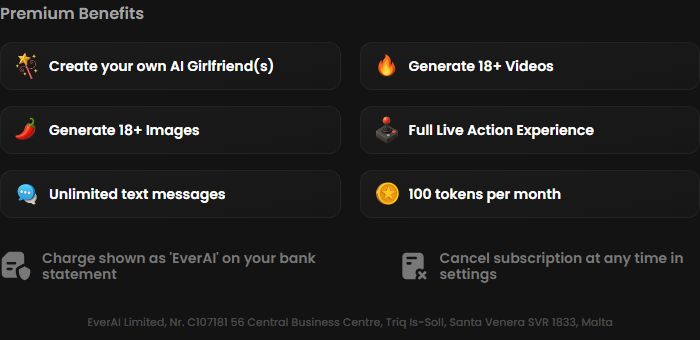
Free plan or Premium: what each one lets you see
The free plan is a demo, so the question of NSFW on it barely arises: five messages in total are over before a conversation gets anywhere. The real dividing line is media, which the free plan does not include in its 18+ form, and tokens, which it does not have at all.
| What | Free plan | Premium |
|---|---|---|
| Text chat | 5 messages in total | Unlimited, adult roleplay accepted |
| 18+ images | No; 1 image in total | Yes, 4 tokens each |
| 18+ videos | No | Yes, paid in tokens, still marked beta |
| Live action | No | Full access, skips in tokens |
| Private content packs | No tokens to unlock them | 70 to 530 tokens a pack, set per character |
| Your own character | 1 character | Yes, 10 tokens each, kinks screen up to 3 |
Premium costs from 3.99 a month on the 12-month plan, with 100 tokens a month. The plan grid is in our pricing guide, and the free plan line by line in is Candy AI free.
Over 18 only, and the terms still set limits
The age gate we met is a confirmation at sign-up that you are at least 18. That is the whole check we saw; from an adult account we cannot tell you whether anything else happens behind it. In the character creator, the age slider starts at 18, so a custom character cannot be set younger.
"Allowed" does not mean "anything goes". Generated pictures follow your prompt within the site's rules, and the Safe Chat Disclaimer and the terms of service list what is not allowed. We do not reproduce that list here; read it on candy.ai before you test the edges. The wider privacy side, who may read what you write, is in is Candy AI safe.
Three places where you change what she sends
Because there is no master switch, the controls are spread out: some act on one character, some on all of them, and two act on the whole account. Changing the wrong level is the usual reason a setting "does not work".
One character: the sliders icon in the chat
Next to the message box. The panel opens with Media preferences on top: "What can she send you" with a count of allowed media types, Media frequency and Scene video length. Below come model, memory, response length, custom style, language, texting style and narration.
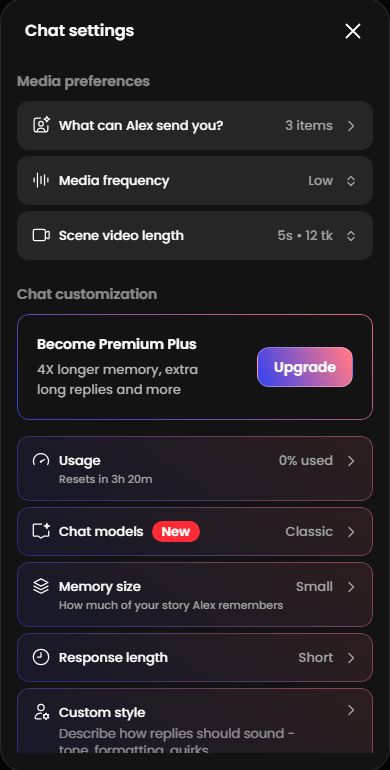
Every character: Settings, Chat settings, Manage
The account settings page has a Chat settings card with a Manage button. It opens the Default chat settings, the same list applied to every character that has no settings of its own.
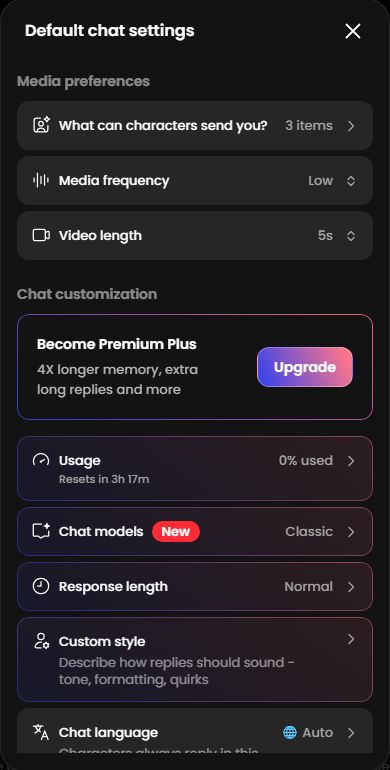
The whole account: the Proactive toggles
Lower on the settings page, Proactive AI Messages and Proactive Media decide whether characters write to you and send pictures on their own. Proactive pictures are charged like requested ones.
Nine controls and the exact effect of each
Most of these are not labelled as adult settings, yet together they decide how explicit, how frequent and how expensive the media side gets. Narration and Custom style shape the text; the rest shape what is sent.
| Control | Where | Effect |
|---|---|---|
| What can she send you | Chat settings | The media types the character may send; 3 allowed on our account |
| Media frequency | Chat settings | How often unprompted pictures arrive; Low on ours |
| Scene video length | Chat settings | 5 seconds at 12 tokens; longer costs more |
| Narration | Chat settings | Actions and scene direction in asterisks, which drive roleplay |
| Custom style | Chat settings | Free text on tone and limits, read with every reply |
| Proactive AI Messages | Account settings | Characters write first |
| Proactive Media | Account settings | Characters send pictures first |
| Kinks | Character creator | Up to 3 themes, for your own character only |
| Relationship levels | Chat header | Photo and video requests unlock as the bond grows, on catalogue characters |
Level names change from one character to another. With Diana Demont the photo button waits for Flirting; in Emily Foster's chat, photos unlock at After-hours and videos at Late nights. How levels rise is in our memory and modes guide.
An evening with media on, counted in tokens
Text costs nothing on Premium, so the bill for adult content comes entirely from media. Proactive pictures are the part people forget, because they arrive without a click. Here is one evening on a Premium account, with the prices from the tokens page and the chat settings.
| Item | Tokens |
|---|---|
| 3 pictures you ask for, at 4 each | 12 |
| 2 scene videos of 5 seconds, at 12 each | 24 |
| 2 pictures sent on her own with Proactive Media on | 8 |
| Total | 44 |
That is 44 of the 100 monthly tokens in one evening; a second evening like it leaves 12. Turn Proactive Media off and the same evening costs 36. Every price per action is listed in our tokens guide.
Turning it down: settings for calmer chats
You cannot switch adult content off for the whole account, but you can make it rare. The character follows a clear sentence in Custom style better than any toggle in our tests, so start there and use the media settings to stop surprises.
- Custom style: one sentence on what you want and what you do not, for example "keep it romantic, no explicit descriptions".
- What can she send you: keep only the media types you want.
- Media frequency: set it to Low on each chat, or once in the Default chat settings.
- Proactive Media and Proactive AI Messages: off, so nothing arrives unless you open the chat and ask.
- Narration: off, if the scene direction in asterisks pulls the story somewhere you did not want.
Where the explicit material sits on the site
Most of the adult media on Candy AI is not in the chat at all. It sits in paid formats you choose to open, each with its own price, which is another reason a global switch would not make much sense.
- Private content packs: photo and video sets sold by a character, blurred until unlocked. See the private packs guide.
- Live action: nine levels, mild at the first and explicit higher up. See the live action guide.
- Shorts: video series sorted by adult categories, sold one series at a time.
- The video studio: Lite and Pro presets that are explicit by default; we show no screenshot of it.
- Generated images: whatever you prompt, within the rules. The image guide covers the generator.
FAQ
Does Candy AI allow NSFW?
Yes, for adults on a paid plan. 18+ images and videos are Premium benefits, and chats accept adult roleplay without any setting.
Do you have to pay for NSFW on Candy AI?
Yes, for the media. The free plan has 5 messages and 1 image and no 18+ pictures or videos. Premium starts at 3.99 a month on the 12-month plan.
Is there an NSFW toggle in the settings?
No. In our checks there is no single switch. The controls are the media preferences in each chat, the Default chat settings and the Proactive toggles.
How do I turn NSFW off on Candy AI?
Partly, with three settings: Media frequency on Low, Proactive Media off, and a Custom style sentence saying what you do not want. Text roleplay itself has no off switch.
Does Candy AI verify your age?
With a confirmation. You state at sign-up that you are an adult, and the creator's age slider starts at 18. We saw no other check from our adult account.
Why can I not ask her for a photo yet?
Relationship levels. On catalogue characters, photo and video requests unlock at set levels, and their names differ from one character to another.
See also