You want to stop paying for Candy AI, or you were just charged and want the money back. Cancelling takes a minute: open Settings, scroll to the plan block and click Unsubscribe. You keep Premium until the end of the period you paid for, and nothing renews after that. A refund is a separate request, and the terms set tight limits: within 24 hours of the payment and no more than 20 tokens used.
This page walks through the four cancellation steps, what stays and what ends afterwards, why there is nothing to cancel at Apple or Google, the refund rules as the terms write them, how to ask, and the difference between cancelling, deleting and a chargeback. The screens come from the settings page of our own paid Premium account, the rules from the subscription and refund sections of the terms. We are not Candy.ai and cannot process a refund for you.
In short
- Cancel in Settings: plan block at the bottom, Unsubscribe link. No email to support needed.
- Access runs to the end of the paid period. Subscription tokens end with it; pack tokens stay.
- No store subscription: Candy AI bills you directly, as EverAI on your statement.
- Refunds per the terms: within 24 hours, refused past 20 tokens used, card payments only.
Cancel in four steps from the settings page
Cancellation lives in the account settings because Candy AI bills you directly, so there is no store or third party in between. The terms describe it as going to "Settings / Unsubscribe within your account". It works the same in a desktop browser, on your phone or in the installed web app.
Open Settings
Click the avatar at the top right, then Settings. The page title is Profile Settings.
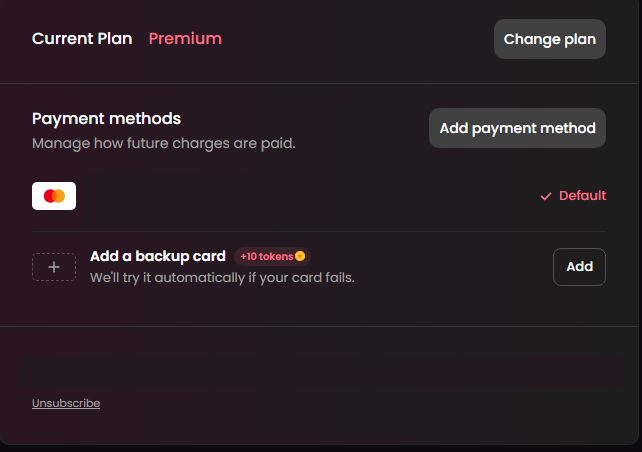
Scroll to the plan block
It is the last card on the page, below the chat defaults, the language and the toggles. It shows Current Plan, Change plan, payment methods, the last payment date and the renewal date.
Click Unsubscribe
The small underlined link at the bottom left of the card. We have not clicked it on our test account, which we keep active, so we cannot show the confirmation screen.
Check the plan line
Once cancelled, the Current Plan line should reflect it while the paid period runs. If nothing changes, contact the Help Center linked from the same page.
You keep Premium until the paid period runs out
Cancelling stops the next renewal; it does not end the plan you already paid for. So there is no gain in waiting until the last day, and no loss in cancelling the day after you subscribe. The only thing with a deadline is your token balance from the subscription.
| What | After you unsubscribe | Source |
|---|---|---|
| Premium features | Kept until the end of the current period | Terms, subscription section |
| Next payment | None, renewal stops | Terms |
| Subscription tokens | Usable until the period ends, then gone, not refunded | Terms |
| Pack tokens | Stay on the account | Terms, non-subscription purchases |
| Chats, images, your characters | Stay on the account | The account is kept, only the plan ends |
| Subscribing again | Possible; expired subscription tokens do not come back | Terms |
Before the end date, spend what is left: with 60 tokens remaining, that is 15 images or 20 minutes of calls. Prices per action are in the tokens guide.
Nothing to cancel at Apple or Google
Candy AI has no app in the App Store or on Google Play. It runs as a website and a progressive web app, so even if you use it from a home screen icon on your phone, the subscription was paid on the website and is managed there. Looking for it in your Apple or Google subscriptions will find nothing.
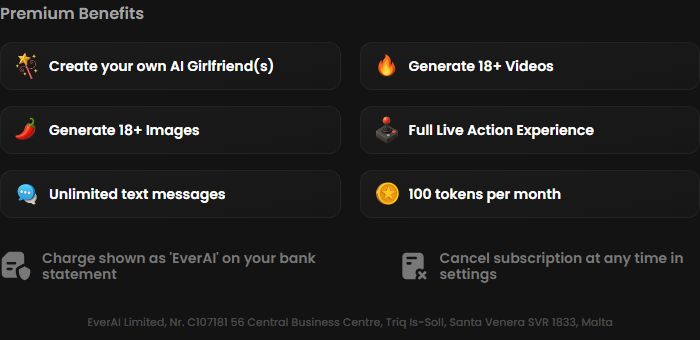
On your bank or card statement, the charge does not say Candy: it reads EverAI, the name of EverAI Limited, the Malta company that runs the service. The bottom of the subscriptions page says it in plain words, next to "cancel subscription at any time in settings". How to install the web app is in our getting started guide.
The refund rules in the terms: 24 hours and 20 tokens
Cancelling and getting money back are two separate things. The refund conditions are written in the refunds section of the terms of service, and they are strict. Below is our summary of that text, without interpretation.
- Subscriptions: "You have 24 hours after your payment to request a refund." After 24 hours, no refund. Whatever the timing, the request is refused if more than 20 tokens were used.
- Token packs: the same 24-hour window, refused if the tokens were used.
- Card payments only: the terms say they can only refund subscriptions and token packages bought by card.
- Not refunded: technical problems on your side, and purchases made in error that did not come from Candy AI.
- If a refund is granted: the subscription is cancelled at once and the remaining premium features and tokens are removed when it is processed.
- EU consumers: the terms mention the right of withdrawal with a model form, and reimbursement "less a prorated amount that reflects the services consumed".
Asking for a refund: what to send and where
There is no refund button in the settings. The request goes to support, and the clock is short, so prepare everything before you write.
Note the payment time
The 24 hours start at the payment, not at the moment you notice the charge. Your bank app shows the exact time.
Stop using tokens
Each image or call minute counts toward the 20-token limit on a subscription, and any use of a pack blocks its refund.
Write to the Help Center
everai.zendesk.com, linked as Help Center from the settings page, is the official channel. Give the account email, the payment date and the amount.
Keep the ticket number
Keep it with any cancellation email. A refund on a card goes back to that card.
A refund request, worked through with real numbers
The 20-token limit is easy to pass without noticing, because the subscription credits 100 tokens the moment you pay. Take a Premium month paid at 13.99 at 9 in the evening.
| What you did before asking | Tokens used | Under the terms |
|---|---|---|
| Chatted by text only, asked the next morning | 0 | Within 24 hours, under 20 tokens: can be requested |
| Generated 4 images | 16 | Still under 20: can be requested within 24 hours |
| Generated 4 images and made a 2-minute call | 16 + 6 = 22 | Over 20: refused |
| Used nothing, asked two days later | 0 | Past 24 hours: refused |
On a yearly plan the stakes are larger: 47.88 is charged at once, and after the first 24 hours the terms give no refund for the unused months. You keep access until the twelve months end instead.
Cancel, delete or charge back: three different exits
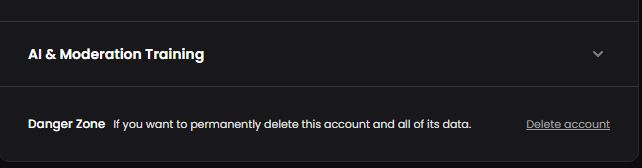
They look alike from the outside and have very different results. Cancelling stops the renewal and keeps your account, chats and characters; it is the right move if you only want to stop paying. Deleting the account, from the Danger Zone of the settings, removes the account and its data and does not refund the period; do it after the paid time ends, as our delete account guide explains. A chargeback through your bank cancels the purchase at once, according to the terms.
There is no pause option on the settings page. If you plan to come back, cancelling is the closest thing: your characters wait for you. If you are leaving for another app, our alternatives page lists the main ones.
Four ways a cancellation costs more than it should
FAQ
How do I cancel my Candy AI subscription?
In Settings. Scroll to the plan block at the bottom and click Unsubscribe; the terms call it "Settings / Unsubscribe". Premium stays active until the paid period ends.
Do I get a refund when I cancel?
No, not automatically. Cancelling only stops the next payment. A refund must be requested within 24 hours of payment and is refused if more than 20 tokens were used.
Can I cancel Candy AI through Apple or Google?
No. There is no store app, so no store subscription. Cancel in the settings on candy.ai, from any browser or the web app.
Why does my statement say EverAI?
Because EverAI Limited, based in Malta, runs Candy AI and bills for it. The subscriptions page names EverAI as the billing name.
What happens to my tokens when I cancel?
Subscription tokens stay usable until the period ends, then they are gone. Tokens bought as packs stay on the account.
Who do I contact about a refund?
The Help Center at everai.zendesk.com, linked from the settings page. Include the account email, the payment date and the amount.
See also